

Extensive Industry Experience

Quick and Accurate Quotes

Strong Industry Partnerships

24*7 Customer Service Support

Recognized Nakivo Partners

Commitment of Timely Service

CALL US: +91-11-46515639/40
To receive a quick quotation and response, please submit your requirement here. (24×7 quote by our NAKIVO Expert)

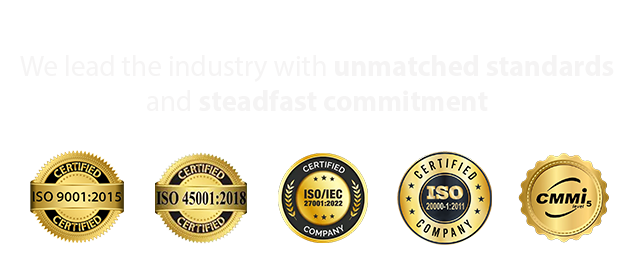

NAKIVO Office 365 Backup Solutions in India – Expert Deployment & Support
Protect Microsoft 365 Data with Reliable Backup, Flexible Recovery & Expert Deployment
Safeguard your business emails, documents, shared files, and collaboration data with NAKIVO Office 365 backup solutions. Radiant Info Solutions Pvt. Ltd., a NAKIVO partner, helps businesses evaluate, plan, and deploy data protection solutions for Microsoft 365 environments.
Microsoft 365 applications such as Exchange Online, OneDrive for Business, SharePoint Online, and Microsoft Teams are essential to everyday business operations. Accidental deletion, malicious activity, ransomware incidents, and retention gaps can put important business information at risk.
NAKIVO Backup & Replication provides dedicated Microsoft 365 backup and recovery capabilities that help organizations maintain additional copies of supported cloud data and restore selected items when required.
Radiant Info Solutions assists organizations with solution assessment, licensing coordination, deployment planning, backup configuration guidance, and recovery strategy development based on their Microsoft 365 environment.
what we offer
Office 365 Backup Consulting & Assessment
- Evaluation of Microsoft 365 workloads including Exchange Online, OneDrive, SharePoint, and Teams
- Backup strategy aligned with data retention, compliance, and business continuity requirements
NAKIVO Office 365 Solution Architecture & Design
- Customized backup architecture for single-tenant and multi-tenant environments
- Scalable design supporting growing users and data volumes
Authorized NAKIVO License Supply & Advisory
- Recommendation and supply of NAKIVO Office 365 backup licenses
- License optimization for cost control and future growth
End-to-End Deployment & Configuration
- Installation and configuration of NAKIVO Office 365 Backup platform
- Secure integration with Microsoft 365 tenant and repositories
Exchange Online Backup & Granular Recovery
- Backup of mailboxes, calendars, contacts, and public folders
- Granular restore of emails, mailboxes, and attachments
OneDrive, SharePoint & Teams Backup
- Protection of user OneDrive files and SharePoint sites
- Backup and recovery of Microsoft Teams data and documents
Offsite, Cloud & Immutable Backup Storage
- Backup to on-prem, offsite, and S3-compatible cloud storage
- Immutable backups for ransomware and accidental deletion protection
Monitoring, Reporting & Performance Optimization
- Continuous job monitoring, alerts, and backup health reporting
- Optimization of backup schedules, storage usage, and performance
AMC, Technical Support & Managed O365 Backup Services
- Annual Maintenance Contracts with proactive health checks and upgrades
- Fully managed Office 365 backup services ensuring data security
Connect Now, Get Quick Responses!
How it Works

Contact Us
Reach out to our team via phone, email, or our website contact form. Provide some basic information about your business and plans you’re interested in.

Our Team Review the Requirement
Our experts will review your current need and explore the best options to optimize your requirements, ensuring you get the most cost-effective and efficient solution for your business.

Receive Your Customized Quotation
After the review, we will provide you with a detailed, personalized quotation, including pricing and recommendations tailored to your business needs.
Get started today by contacting us, and let’s find the best solution for your business!
Our End to End NAKIVO Office 365 Backup Solutions :

1. Microsoft 365 Tenant Assessment & Discovery
- Review of Exchange Online, OneDrive, SharePoint, and Teams usage
- Identification of data criticality, retention policies, and compliance needs.

2. Backup Strategy Consulting & Solution Design
- Recommendation of the right NAKIVO Office 365 backup architecture
- Design for scalability, security, and long-term data retention.

3. License Planning & Authorized Procurement
- Finalization of NAKIVO Office 365 backup licenses based on user count
- Authorized license supply with transparent pricing and renewal planning.

4. NAKIVO Deployment & Microsoft 365 Integration
- Installation and configuration of NAKIVO Office 365 Backup platform
- Secure integration with Microsoft 365 tenant and backup repositories.
5. Backup Policy, Security & Automation Setup
- Configuration of automated backup schedules and retention policies
- Setup of encryption, access controls, and ransomware protection.
6. Granular Restore & Recovery Validation
- Validation of mailbox, OneDrive, SharePoint, and Teams recovery
- Restore testing for accidental deletion and data corruption scenarios.
7. Monitoring, Reporting & Performance Optimization
- Continuous monitoring of backup jobs and alerts
- Optimization of backup performance, storage usage, and job scheduling.
8. Handover, Training & Ongoing Support
- Knowledge transfer and administrator training
- AMC, upgrades, proactive support, and managed Office 365 backup services
Why Partner with Us?
1. Authorized Nakivo Partner
- Radiant Info Solutions is a certified Nakivo partner, delivering genuine data protection and backup solutions backed by full vendor support and licensing compliance.
2. Comprehensive Data Backup & Recovery Solutions
- We offer Nakivo’s advanced solutions for VM backup, cloud backup, replication, and disaster recovery. Our offerings ensure business continuity and data integrity
3. Expert Deployment & Integration Services
- Our skilled team ensures smooth installation and integration of Nakivo with VMware, Hyper-V, NAS, and cloud environments. We customize solutions based on your infrastructure.
4. Proactive Support & Maintenance
- Radiant offers continuous monitoring, updates, and technical support to keep your backup systems reliable and secure. We also provide AMC and managed service options.
5. Nationwide Reach & Prompt Service
- With a PAN India presence, we deliver Nakivo solutions quickly and provide localized technical assistance. Our support ensures minimal downtime and responsive service.


150+
Successful Deployments

15+ Years
Data Protection Experience

10+
Certified Deployment Experts

360°
End-to-End Backup Management
Featured in the Media
















Key Benefits of NAKIVO Office 365 Backup Solutions
Centralized Backup Management
Manage supported Microsoft 365 backup activities through NAKIVO’s centralized interface, helping IT administrators organize backup jobs and monitor operations.
Flexible Backup Storage
NAKIVO supports storing Microsoft 365 backups in eligible cloud and local destinations, including supported network shares and deduplication appliances. Additional copies can also be sent to supported destinations, including tape for air-gapped storage. <Cite refs={[“turn991578view1”]}/>
Granular Recovery Options
Recover supported data items such as emails, contacts, calendar events, files, folders, sites, document libraries, and eligible Teams content, depending on the workload and recovery scenario.
Backup Retention Planning
Configure retention according to organizational policies, data importance, storage capacity, and recovery requirements.
Enhanced Data Protection
Maintain backup copies separate from the primary Microsoft 365 service and evaluate suitable security controls for backup storage, administration, and access.
Support for Business Continuity
Develop recovery procedures that help reduce disruption when supported Microsoft 365 data is accidentally deleted, corrupted, or otherwise lost.
Important: Backup coverage, retention, and recovery are configuration-dependent. Organizations should periodically test recovery procedures and verify that required data types are included in backup jobs.
NAKIVO Office 365 Backup Software for Business Data Protection
Microsoft 365 provides cloud-based productivity and collaboration services, but organizations still need to plan how their application data will be backed up and recovered.
NAKIVO Backup & Replication helps businesses establish structured backup policies for supported Microsoft 365 services. Organizations can select relevant data sources, configure backup jobs, choose supported storage destinations, and define retention requirements.
Key capabilities include:
- Backup of supported Exchange Online mailboxes and group mailboxes.
- Protection of OneDrive for Business data.
- Backup of supported SharePoint Online sites and content.
- Backup of supported Microsoft Teams data.
- Flexible backup destinations, including supported local and cloud storage.
- Recovery of supported items to Microsoft 365 accounts and other eligible destinations.
- Backup scheduling and retention management.
- Additional backup copies for enhanced data protection.
Available features and recoverable items depend on the NAKIVO version, Microsoft 365 service, permissions, and supported configuration.
NAKIVO Office 365 Backup Deployment Options
The appropriate deployment should reflect your Microsoft 365 tenant, data volume, storage preferences, security policies, and recovery objectives.
Local Storage Deployment
Evaluate supported local storage repositories for organizations that want to retain backup data within their own IT environment.
NAS or Network Share Backup Storage
Use eligible CIFS/SMB or NFS destinations where supported by the selected configuration and repository requirements.
Cloud Backup Storage
Evaluate supported cloud destinations for additional data protection and geographically separate backup copies.
Additional Backup Copies
Consider a multi-copy backup strategy that combines appropriate local and cloud storage, with separate access controls and recovery procedures.
Radiant Info Solutions can help assess your existing environment and coordinate the appropriate deployment and configuration requirements.
NAKIVO Office 365 Backup Licensing Guidance
NAKIVO offers a dedicated subscription licence for Backup for Microsoft 365. According to its licensing policy, licensing is based on the number of unique Microsoft 365 users requiring protection and is available on annual subscription terms. Eligible Microsoft 365 subscription licensing can be purchased separately or combined with certain existing NAKIVO licensing arrangements. <Cite refs={[“turn991578view2”]}/>
Before selecting a licence, consider:
- Total number of users requiring protection.
- Microsoft 365 services used by those users.
- Required backup and recovery scope.
- Existing NAKIVO licences, if applicable.
- Backup storage and retention requirements.
- Support coverage and subscription duration.
- Current compatibility and deployment prerequisites.
Radiant Info Solutions can help review these requirements and coordinate a suitable NAKIVO licensing enquiry and quotation.
Why Choose Radiant Info Solutions for NAKIVO Office 365 Backup?
Radiant Info Solutions Pvt. Ltd. is a NAKIVO partner supporting businesses with backup software selection, licensing coordination, IT infrastructure planning, and deployment guidance.
Our engagement can include:
- Requirement Assessment: Review your Microsoft 365 tenant, users, services, and data protection priorities.
- Solution Selection: Identify suitable NAKIVO Microsoft 365 backup capabilities.
- Licensing Consultation: Coordinate licence enquiries based on protected users and required services.
- Deployment Planning: Assess prerequisites, permissions, connectivity, and repository requirements.
- Backup Configuration Guidance: Plan backup jobs, storage destinations, and retention settings.
- Recovery Planning: Establish appropriate recovery procedures and validation practices.
- Existing Environment Review: Help identify compatibility or configuration considerations for current backup deployments.
- Quotation Coordination: Prepare a proposal based on confirmed requirements and applicable licensing terms.
Implementation scope and ongoing support are agreed according to your technical environment and project requirements.
NAKIVO Backup for Microsoft 365 – Supported Services
- Exchange Online Backup
Exchange Online contains business-critical emails, contacts, calendars, and mailbox information. NAKIVO provides backup and recovery capabilities for supported user and group mailboxes.
Businesses can use backup policies to establish recovery points for supported mailbox data and retrieve eligible items when required.
Typical use cases:
- Protecting business email data.
- Recovering accidentally deleted supported mailbox items.
- Supporting email retention and recovery procedures.
- Improving resilience against data loss.
Important current consideration: NAKIVO’s published guidance dated September 16, 2026, explains that Microsoft’s Exchange Web Services (EWS) deprecation affects Exchange Online mailbox and group-mailbox backups. Microsoft began phased blocking on October 1, 2026, with permanent EWS removal scheduled for April 1, 2027. Administrators should verify their NAKIVO EWS allow-list configuration and current product guidance to maintain mailbox backup continuity. <Cite refs={[“turn991578view0”]}/>
- OneDrive for Business Backup
OneDrive for Business stores individual users’ business documents, work files, and other cloud-based content. NAKIVO can protect supported OneDrive data through configured Microsoft 365 backup jobs.
This helps organizations establish an additional recovery option for important user files.
Typical use cases:
- Recovering supported files and folders.
- Protecting business documents from accidental deletion.
- Maintaining additional backup copies of user data.
- Supporting employee onboarding, offboarding, and data recovery procedures.
- SharePoint Online Backup
SharePoint Online supports document management, intranet portals, departmental collaboration, and shared business information.
NAKIVO can back up supported SharePoint Online sites and content, helping organizations establish recovery procedures for critical collaboration data.
Typical use cases:
- Protecting departmental document libraries.
- Recovering supported site content.
- Supporting collaborative business workflows.
- Maintaining additional copies of important shared documents.
- Microsoft Teams Backup
Microsoft Teams supports team communication and collaboration across departments and locations. NAKIVO offers backup and recovery capabilities for supported Teams data.
Depending on the selected configuration and supported content types, protection can include eligible teams, channels, posts, and related collaboration data.
Typical use cases:
- Protecting supported Teams and channel content.
- Recovering eligible collaboration information.
- Supporting business continuity for distributed teams.
- Maintaining additional copies of critical collaboration data.
Get Started with NAKIVO Office 365 Backup Solutions in India
Protecting Microsoft 365 data requires more than relying on cloud availability. A well-planned backup strategy helps organizations establish additional copies of important business information and prepare for recovery when data loss occurs.
Radiant Info Solutions Pvt. Ltd. can help you evaluate NAKIVO Office 365 backup solutions for Exchange Online, OneDrive for Business, SharePoint Online, and Microsoft Teams.
Share your requirements with our team to discuss the number of users, services requiring protection, storage preferences, licensing requirements, and recovery objectives. Our team can help assess a suitable solution and coordinate a quotation.
Radiant Info Solutions Pvt. Ltd. — Your NAKIVO Partner for Microsoft 365 Backup, Data Protection & Recovery Solutions in India.
FREQUENTLY ASKED QUESTIONS
What is Office 365 Backup by NAKIVO?
Office 365 Backup by NAKIVO is a comprehensive solution designed to protect your Office 365 data, including Exchange Online, SharePoint Online, OneDrive for Business, and Microsoft Teams. It ensures that your critical business data is securely backed up and easily recoverable.
Why should I backup Office 365 data?
While Microsoft provides robust infrastructure and uptime for Office 365 services, they do not guarantee complete data protection against user errors, malicious attacks, or data retention policy gaps. Backup solutions like NAKIVO ensure that your data is fully protected and recoverable.
How does NAKIVO ensure data security during Office 365 backups?
NAKIVO uses AES 256-bit encryption both in-transit and at-rest to ensure that your Office 365 data remains secure. Data is encrypted before transfer and remains encrypted in backup repositories.
How easy is it to install and configure NAKIVO Office 365 Backup Solution?
NAKIVO provides a user-friendly interface and straightforward setup process for Office 365 Backup. Radiant Info Solutions offers professional deployment services to ensure a seamless installation and configuration.
How does NAKIVO handle data recovery for Office 365 backups?
NAKIVO provides granular recovery options, allowing you to restore individual emails, files, documents, and even entire sites or mailboxes from Office 365 backups. This ensures minimal downtime and quick recovery of critical data.
What kind of support does Radiant Info Solutions provide for NAKIVO Office 365 Backup Solution?
Radiant Info Solutions offers comprehensive support services, including consultation, deployment, configuration, and ongoing technical support for NAKIVO Office 365 Backup Solution.
How does NAKIVO ensure that Office 365 Backup Solution remains up-to-date with new features?
NAKIVO regularly updates its Office 365 Backup Solution with new features and enhancements to meet evolving data protection needs. Radiant Info Solutions assists businesses in adopting these updates seamlessly.
What are the pricing options for NAKIVO Office 365 Backup Solution?
Pricing for NAKIVO Office 365 Backup Solution varies based on the number of Office 365 users and the storage requirements. Radiant Info Solutions can provide customized quotes and flexible licensing options to meet your business needs.
Does NAKIVO Office 365 Backup comply with data protection regulations?
NAKIVO Office 365 Backup Solution helps businesses comply with data protection regulations by providing secure backups and granular recovery options for Office 365 data, ensuring data integrity and privacy.
How does NAKIVO Office 365 Backup Solution support business continuity and disaster recovery?
NAKIVO Office 365 Backup Solution ensures that your critical Office 365 data is always available and recoverable, helping businesses maintain continuity and recover quickly from data loss incidents.
Who is Radiant Info Solutions?
Radiant Info Solutions is a trusted IT service provider and partner of NAKIVO in India. They specialize in offering a range of IT solutions, including Office 365 Backup services, to businesses of all sizes.
What are the key features of NAKIVO Office 365 Backup Solution?
Key features of NAKIVO Office 365 Backup Solution include:
- Automated backup of Exchange Online, SharePoint Online, OneDrive for Business, and Microsoft Teams data.
- Granular recovery options for emails, files, and documents.
- Support for incremental backups and global deduplication to optimize storage space.
- AES 256-bit encryption for data security.
Can NAKIVO backup other Office 365 data besides emails?
Yes, NAKIVO Office 365 Backup Solution can backup Exchange Online emails, SharePoint Online sites and libraries, OneDrive for Business files, and Microsoft Teams data, ensuring comprehensive data protection.
Can I schedule automated backups for Office 365 data with NAKIVO?
Yes, NAKIVO allows you to schedule automated backups of your Office 365 data, ensuring regular and reliable protection without manual intervention.
Can I recover Office 365 data to a different location or tenant?
Yes, NAKIVO Office 365 Backup Solution supports flexible recovery options, including restoring data to the original location, a different Office 365 tenant, or on-premises environments, providing flexibility in disaster recovery scenarios.
Are there training resources available for NAKIVO Office 365 Backup users?
Yes, NAKIVO and Radiant Info Solutions provide training resources, including documentation, online tutorials, and customer support, to help users maximize the benefits of Office 365 Backup.
How can I get started with NAKIVO Office 365 Backup Solution through Radiant Info Solutions?
To get started with NAKIVO Office 365 Backup Solution, contact Radiant Info Solutions for a consultation. Their team will guide you through the deployment process and ensure that your Office 365 data is securely backed up and protected.
How can I get a quote for NAKIVO Office 365 Backup Solution?
To get a quote for NAKIVO Office 365 Backup Solution, you can contact Radiant Info Solutions directly. They will assess your Office 365 environment and provide a tailored pricing plan that suits your data protection requirements.
Is NAKIVO Office 365 Backup Solution compatible with other backup solutions?
NAKIVO Office 365 Backup Solution is designed to integrate seamlessly with other NAKIVO backup solutions and third-party applications, providing a unified approach to data protection across your IT environment.
Can NAKIVO Office 365 Backup Solution scale with my business growth?
Yes, NAKIVO Office 365 Backup Solution is scalable, allowing businesses to expand their backup infrastructure as their Office 365 data grows. It offers performance optimizations to handle large volumes of data efficiently.